
An iPhone takes the power it asks for, not the power the charger can offer. It charges more slowly above 80% and might slow down when it is too hot or too cold, and while it charges, part of the power runs the phone or is lost as heat instead of filling the battery. So a reading below the charger's rating is normal. The charger side is the limit in a few cases, such as a USB-A port, a shared multi-port charger or hub, or an adapter below Apple's requirement for your model.
What does the watt rating on a charger mean?
The watt rating is a ceiling. Apple calls 35W "the maximum amount of power that the power adapter can deliver" for its 35W Dual USB-C Port Power Adapter, and says its 40W Dynamic Power Adapter with 60W Max is designed to "dynamically deliver up to 60W of output".
USB Power Delivery (USB PD) is the standard from the USB Implementers Forum (USB-IF) that lets a USB-C charger and a phone agree on more power than basic USB provides. The USB-IF says it lets each device "take only the power it requires". The charger offers; the iPhone decides.
Apple publishes no maximum wired wattage on the tech specs for the iPhone 17e, iPhone Air, iPhone 17, iPhone 18 Pro or iPhone Duo. It gives the adapter you need and how long the iPhone takes to reach 50%, for example "Up to 50% charge in 30 minutes" with a 20W adapter or higher for the iPhone 17e.
How much of the rating reaches the battery?
Apple's own charging times answer this. Apple says how long each model takes to charge a drained battery to 50% with a given adapter. Half the battery's energy divided by that time is the average power that went into the battery over the first half of the charge.
That average is our calculation, not an Apple figure and not a measurement: battery Wh × 50% ÷ hours to 50%. For the iPhone 17e, 15.556 Wh × 0.5 ÷ 0.5 h = 15.6 W, which is 78% of the 20W adapter Apple names.
| Model | Adapter Apple names | Apple's time to 50% | Battery | Average into the battery (calculated) | Share of the adapter rating |
|---|---|---|---|---|---|
| iPhone 17e | 20W adapter or higher | 30 min | 15.556 Wh | 15.6 W | 78% |
| iPhone Air | 20W adapter or higher | 30 min | 12.26 Wh | 12.3 W | 61% |
| iPhone 18 Pro | 60W-capable adapter with AVS | 15 min | 16.76 Wh | 33.5 W | 56% |
| iPhone 18 Pro Max | 60W-capable adapter with AVS | 15 min | 21.751 Wh | 43.5 W | 73% |
| iPhone Duo | 60W-capable adapter or higher | 20 min | 19.06 Wh | 28.6 W | 48% |
- Times: Apple's tech specs and "Fast charge your iPhone" (October 22, 2026), from a drained battery. Apple says its times are "measured from the appearance of the Apple logo as the unit started up".
- Test adapters: Apple 20W USB-C Power Adapter (iPhone 17e) and 40W Dynamic Power Adapter with 60W Max (iPhone 18 Pro models, iPhone Duo); for the iPhone Air, the spec page names the 20W adapter and the support footnote the 40W one. The 60W rows use the 60W Apple asks for.
- AVS (Adjustable Voltage Supply) is a USB PD mode in which the phone can ask for in-between voltages.
- Batteries: iFixit teardown labels (eSIM-only iPhone 18 Pro models); iPhone Duo: its two cell labels, 11.56 + 7.5 Wh, from teardown videos reported by MacRumors, matching Apple's 4,883 mAh.
- One minute more or less on Apple's rounded times moves a result by up to about 3% (30 minutes), 5% (20 minutes) or 7% (15 minutes).
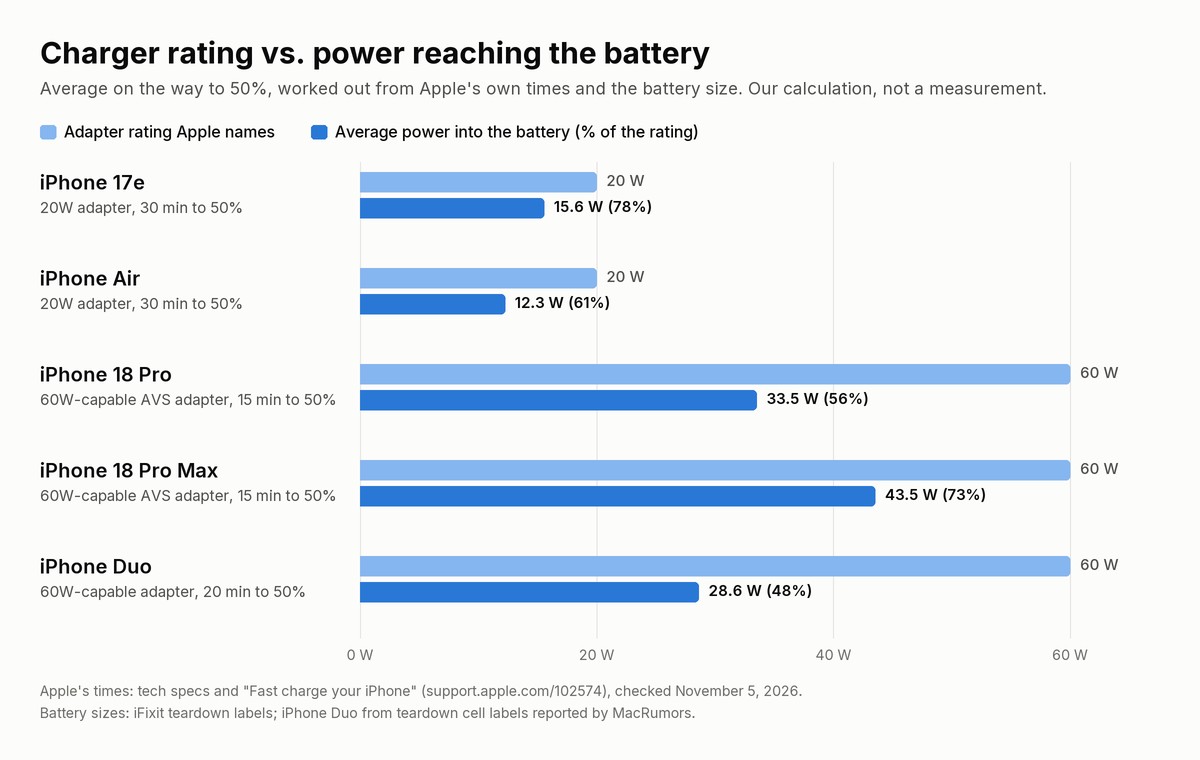
Even by Apple's own test times, the battery takes in about half to four-fifths of the adapter's rating on average. Apple does not say how that gap splits up. It does say that charge time "varies with adapter, settings, usage, and environmental factors", and that a battery warms up as it charges: energy that never becomes charge.
The share depends on the phone as well as the adapter. With the same adapter and the same 15 minutes, the iPhone 18 Pro Max, with its larger battery, takes in about 30% more power than the iPhone 18 Pro (43.5 W against 33.5 W). For the iPhone 18 Pro models in detail, see iPhone 18 Pro charging speed.
Why does my iPhone take less than the charger can give?
These causes come from the iPhone itself, and none of them means the charger is faulty:
| Cause | What Apple says | What you can do |
|---|---|---|
| Battery above 80% | Fast charging to 80%, then slower trickle charging; the charging current is reduced gradually as the battery nears full | Judge a charger below 80% |
| Optimized Battery Charging or Charge Limit | Optimized Battery Charging can delay charging past 80%; Charge Limit (iPhone 15 and later) stops within a few points of the limit you set | Touch and hold the Lock Screen notification and tap Charge Now, or change the limit in Settings > Battery > Charging |
| Too warm or too cold | Fast charging might not work when too cold or too hot; software might limit charging above 80% when the battery is too warm, and charging can go on hold in extreme temperatures | Move the iPhone and charger somewhere cooler; take it out of its case if it gets hot while charging |
| Using the iPhone while it charges | Graphics- or processor-intensive apps, games and camera apps, or streaming high-quality video (especially at full brightness), can reduce charging speed | Leave it alone when you need a fast charge |
The reason behind the last row: power the phone spends on the screen and processor while it charges does not go into the battery. More on the 80% pause in Is it bad to charge your iPhone overnight?
When is the charger, port or cable the problem?
The charger is the real limit in these cases:
- A USB-A port. With a USB-A charger, the iPhone 15 and later charge at a maximum of 7.5W, Apple says, whatever the label on the charger.
- No USB PD. To fast charge an iPhone 15 or later, Apple names an Apple 18W or greater USB-C Power Adapter or a comparable USB-C adapter that supports USB PD.
- Below Apple's figure for your model. Apple's times assume a 40W adapter or higher for the iPhone 17, iPhone 17 Pro and iPhone 17 Pro Max, and a 60W-capable adapter with AVS for the iPhone 18 Pro and iPhone 18 Pro Max. Apple gives two USB PD versions for that adapter: "Fast charge your iPhone" says it "supports USB Power Delivery (USB-PD) 3.2", while the iPhone 18 Pro spec page footnote says "USB PD 3.1 (or better) power adapters with Adjustable Voltage Supply (AVS)". The same article lists those AVS adapters for the iPhone Duo too, while the iPhone Duo spec page asks only for a "60W-capable adapter or higher" and "USB PD power adapters". Apple gives no time for the iPhone 18 Pro models with an adapter that lacks AVS.
- A shared charger, hub, car or computer. On a charger with more than one port, or a computer or USB hub with other devices connected, the maximum power output might be reduced. Apple's 35W Dual USB-C Port Power Adapter gives an iPhone and an iPad up to 17.5W each. Ports in USB hubs or cars might charge slower than a dedicated USB-C charger, and an iPhone connected to a computer that is off or asleep may drain instead.
- A pass-through accessory. An accessory such as a USB-C Digital AV Multiport Adapter might reserve power for its own ports and reduce what reaches the iPhone.
- The cable. Apple says not to use damaged cables or adapters. For the iPhone 18 Pro models and iPhone Duo, Apple's fast-charge footnotes ask for a 60W-capable USB-C cable. USB-IF-certified USB-C cables carry a 60W or 240W logo.
Since iOS 18, the iPhone tells you when the charger is the bottleneck: if a higher-wattage charger could improve charging, iOS shows a "Slow Charger" message on the Lock Screen and in Settings > Battery. Apple says this does not mean anything is wrong with the iPhone or the charger. For other fixes, see why your iPhone is charging slowly.
Why does wireless charging give less than the charger's rating?
Apple says the MagSafe Charger works at "up to 25W of peak power delivery", and that the actual power delivered varies with the iPhone model, the adapter's wattage and system conditions. For up to 25W it needs a 30W or greater adapter rated 15V/2.0A or higher, and a bigger adapter still gives at most 25W peak.
For the iPhone 18 Pro models and iPhone Duo, the spec pages give up to 50% in about 30 minutes "with 35W adapter or higher paired with MagSafe Charger", and "Fast charge your iPhone" also says 35W; the MagSafe article says 30W for the iPhone 18 Pro models and does not list the iPhone Duo. Some models get less: Apple says the iPhone Air will achieve 20W peak power, the iPhone 16 and iPhone 16 Pro 22.5W, and the iPhone 17e up to 15W on MagSafe with a 20W adapter or higher.
Wired accessories such as USB-C headphones lower the limit: to 16W on the iPhone 18 Pro models, iPhone 17 and iPhone Air, and 10W on the iPhone 17 Pro models, says Apple's MagSafe article, while its "About iPhone charge speeds" article says 7.5W. A wireless charger that provides less than 10W, like a Qi1-certified one, can make charging take longer than you expect. In the EU, Apple's notice says wireless charging might use more power than wired charging.
How to check what your iPhone is really getting
- Look for "Slow Charger". Open Settings > Battery while it charges. With iOS 26, the same screen estimates the time to 80%, or to 100% (or your charge limit) above 80%.
- Test below 80%, in a cool room, with the phone left alone, so the iPhone-side causes above stay out of the result.
- Do the math by hand. Note the time at two battery percentages. Average power ≈ battery Wh × (end % − start %) ÷ hours, with your model's battery size from the table above. Worked example, not a measurement: an iPhone 17e that went from 20% to 50% in 18 minutes would give 15.556 × 0.30 ÷ 0.3 = 15.6 W.
- Or let an app do the math. Watt Charging Speed (our app) estimates the watts reaching the battery from how fast the battery level rises and your model's battery size. So it usually reads below the charger's rating, and below a USB power meter in the cable, which also counts what the phone uses and the heat lost on the way. The first number needs up to about 10% of charging with the app open, and on a worn battery it reads roughly 15 to 20% high (at 85% battery health).
- Compare, don't judge one number. Run the same battery range with each charger or cable on the same phone; our charger test shows a simple way.
Questions people ask
Does a higher-watt charger charge an iPhone faster?
Up to the adapter Apple names for your model, yes: with iOS 18 and later, iOS shows "Slow Charger" when a higher-wattage charger could help. Above that, Apple gives no shorter time. Apple quotes its times "with a 40W adapter or higher" for the iPhone 17 models, with a 20W adapter or higher for the iPhone 17e and iPhone Air, and with a 60W-capable adapter for the iPhone 18 Pro models and iPhone Duo. For MagSafe, Apple says higher-wattage adapters still deliver at most 25W peak.
Is it safe to charge an iPhone with a MacBook or 65W charger?
Apple says you can charge an iPhone with a Mac USB-C Power Adapter, or with third-party adapters that comply with applicable safety standards. More in Can you use a MacBook charger for your iPhone?
Why does my iPhone charge at only 7.5W?
Apple documents two 7.5W limits. With a USB-A charger, the iPhone 15 and later charge at a maximum of 7.5W; for faster wired charging, Apple names a USB-C Power Delivery charger. And its charge-speeds article limits wireless charging to 7.5W while a USB-C or Lightning accessory, like headphones, is connected.
Sources
- Apple Support — Fast charge your iPhone (published October 22, 2026), checked November 5, 2026
- Apple Support — About iPhone charge speeds (published March 16, 2026), checked November 5, 2026
- Apple Support — Charge and maintain your iPhone battery, checked November 5, 2026
- Apple Support — About Charge Limit and Optimized Battery Charging on iPhone, checked November 5, 2026
- Apple Support — If your iPhone or iPod touch won't charge, checked November 5, 2026
- Apple Support — How to use your MagSafe Charger with iPhone (published September 18, 2026), checked November 5, 2026
- Apple Support — How to use the 35W Dual USB-C Port Power Adapter, checked November 5, 2026
- Apple Support — About Apple USB power adapters, checked November 5, 2026
- Apple — Batteries: Why Lithium-ion? and Maximizing Battery Life and Lifespan, checked November 5, 2026
- Apple tech specs: iPhone 17e, iPhone Air, iPhone 17, iPhone 18 Pro and iPhone 18 Pro Max, iPhone Duo, checked November 5, 2026
- Apple — 40W Dynamic Power Adapter with 60W Max, checked November 5, 2026
- Apple — Product Information Sheet, iPhone Duo (A3720), checked November 5, 2026
- USB-IF — USB Charger (USB Power Delivery), checked November 5, 2026
- USB-IF — Certified USB Type-C Cable power rating logos (press release, September 30, 2021), checked November 5, 2026
- iFixit — iPhone 17e teardown (March 17, 2026), iPhone Air teardown (September 20, 2025) and iPhone 18 Pro and Pro Max teardown, checked November 5, 2026
- MacRumors — iPhone Duo Teardowns Reveal Two Batteries and More (October 24, 2026), checked November 5, 2026
- frekvens.ai — Watt Charging Speed (our app) support page (how the app estimates), checked November 5, 2026
How this article was made: Written with AI and checked against the sources above by an automated editorial step; published by Frekvens AI. No measurements of our own are used: the average power and the share of the adapter rating are our estimates from Apple's published times and the battery sizes in the sources, and the chart was rendered by script from the same numbers. The image at the top is an AI-generated illustration and shows no real product. Apple has not sponsored or approved this article. iPhone and MagSafe are trademarks of Apple Inc., registered in the U.S. and other countries and regions. App Store is a service mark of Apple Inc.